RH Rising India Opportunities AIF is Now Live!
Know More
RH Rising India Opportunities AIF is Now Live!
Know More
RH Rising India Opportunities AIF is Now Live!
Know More
RH Rising India Opportunities AIF is Now Live!
Know More
RRH Rising India Opportunities AIF is Now Live!
Know More
RH Rising India Opportunities AIF is Now Live!
Know More
ITR Filing Checklist for AY 2026–27: Documents You Need Before You Start
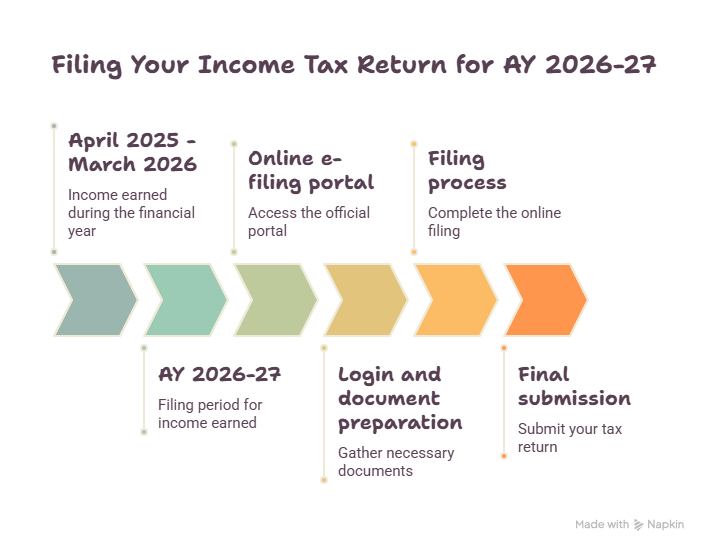
Filing an income tax return means telling the government how much you earned, what you spent, what you saved, and how much tax you already paid during the year. For Assessment Year (AY) 2026-27, which covers income earned between April 2025 and March 2026, this can be done entirely online through the official e-filing portal. Having your documents ready before you log in is what makes the difference between a ten-minute filing and a two-hour one.
This guide lists every document you need and walks through the filing process from login to final submission, for salaried employees, first-time filers, freelancers, and business owners.
Who Needs to File an ITR
Filing is required if your income crosses the basic exemption limit for the year, or if you meet certain other conditions set by law, such as high-value transactions, foreign asset holdings, or deposits above the prescribed threshold in a bank account. Even if your income is below the taxable limit, filing is worth doing if you want to claim a refund on excess tax deducted, carry forward a loss to a future year, or use the return as income proof for a loan or visa application.
Quick Facts: AY 2026–27
Detail
Information
Financial Year covered
FY 2025-26 (April 2025 to March 2026)
Assessment Year
AY 2026-27
Due date for salaried individuals and other non-audit taxpayers
31 July 2026
Due date for non-audit business/professional filers
Note: Due dates can be extended by government notification, so it helps to check the portal’s latest updates section closer to the deadline.
Documents Required for Income Tax Return of Individual
Keep these ready before you start, regardless of the type of income you have.
Basic identity and account details
PAN card
Aadhaar card, linked to PAN
Bank account number and IFSC code, for refunds
Bank statements for the full year, April 2025 to March 2026
Pre-filled tax data
Form 26AS, your consolidated tax statement showing TDS and TCS credited against your PAN
Annual Information Statement (AIS) and Taxpayer Information Summary (TIS), both downloadable from the e-filing portal. If an entry in AIS looks wrong, submitting feedback within AIS itself keeps a record and helps avoid a mismatch notice later.
For salaried individuals
Form 16 from your employer
Salary slips for the year
Rent receipts and landlord PAN, if claiming House Rent Allowance and annual rent exceeds ₹1 lakh
Interest certificates from savings accounts, fixed deposits, or post office schemes
For deduction and investment proofs
Section 80C: life insurance premium receipts, PPF passbook, ELSS statements, NSC certificates, tuition fee receipts, home loan principal repayment
Section 80D: health insurance premium receipts
Section 80E: education loan interest certificate
Section 24(b): home loan interest certificate
For capital gains
Capital gains statement from your broker or mutual fund house
Sale and purchase deeds for property, with stamp duty valuation
Demat account statements
For freelancers, professionals, and business owners
Profit and loss account and balance sheet
Form 16A for any TDS deducted by clients
GST returns, if registered
Books of accounts, invoices, and expense records
Audit report, if turnover crosses the applicable threshold
Choosing the Right ITR Form
Picking the correct form matters. Using the wrong one can get your return marked as defective.
Form
Applicable To
ITR-1
Salaried individuals, one house property, other income, total income up to ₹50 lakh
ITR-2
Individuals or HUFs with capital gains or multiple properties, no business income
ITR-3
Professionals and business owners maintaining regular books of accounts
ITR-4
Presumptive income under Sections 44AD, 44ADA or 44AE, income up to ₹50 lakh
Log in to the e-filing portal using your PAN as user ID and your password. If your PAN is not linked to Aadhaar, you will be prompted to link it before proceeding.
Go to e-File > Income Tax Returns > File Income Tax Return.
Select Assessment Year 2026-27 and choose Online as the mode of filing, then continue.
If you have a return already in progress, choose Resume Filing. To start fresh, choose Start New Filing.
Select your filing status (individual, HUF, or firm) and proceed.
Choose the ITR form that applies to you and proceed. The portal will show you the list of documents needed for that form before you begin.
Select the checkbox that matches your reason for filing (income above the exemption limit, a specific high-value transaction, or otherwise), then continue.
For AY 2026-27, the new tax regime is the default. If you want to file under the old regime instead, you need to actively select that option in the personal information section.
Review the pre-filled data pulled from your PAN, Form 26AS, and AIS. Correct anything that does not match your own records, then confirm each section as you go.
Enter your income and deduction details in the relevant sections, then proceed.
Check the Tax Paid section against your actual TDS, TCS, advance tax, and self-assessment tax.
Review the total tax liability shown. If tax is payable, you will see Pay Now and Pay Later options. Paying immediately is safer since delaying payment can lead to interest charges and being treated as a defaulter.
Click Preview Return, check the declaration, and proceed to preview.
Proceed to validation. If any errors are listed, go back and fix them before continuing.
Once validated, proceed to verification.
E-verify your return. This can be done through Aadhaar OTP, net banking, a bank account or demat account EVC, or a digital signature. E-verification is the fastest option and completes the filing process immediately. If you skip this step, you must e-verify within 30 days of filing, or the return is treated as if it was never filed.
Once verified, you will get a Transaction ID and Acknowledgement Number confirming your return has been submitted.
If you prefer not to use net banking or Aadhaar OTP, you can instead print, sign, and send the physical ITR-V to the Centralized Processing Center, Income Tax Department, Bengaluru 560500, by speed post within 30 days.
How to File ITR Using Form 16
Form 16 is the certificate your employer issues showing your salary breakup and the tax deducted from it across the year. It has two parts: Part A shows a summary of TDS deducted and deposited, and Part B shows the detailed salary structure, exemptions, and deductions considered by your employer.
To use it while filing:
Match the gross salary and TDS figures in Form 16 against the pre-filled data shown on the portal and against Form 26AS.
Use Part B to fill in exemptions such as HRA and LTA if they are not already pre-filled correctly.
Add any deductions not already accounted for by your employer, such as additional 80C investments made after your declaration to HR.
If there is a mismatch between Form 16 and Form 26AS or AIS, rely on your bank statements and investment proofs to identify which figure is correct before submitting.
Form 16 is not compulsory. If you do not have it, you can still file using your salary slips, bank statements, Form 26AS, and AIS.
How to File ITR for a Salaried Person
Most salaried individuals with one house property and no capital gains or business income will use ITR-1 (Sahaj), provided total income is up to ₹50 lakh. The process is:
Gather Form 16, salary slips, bank statements, Form 26AS, and AIS.
Follow the login-to-e-verify steps above, selecting ITR-1 in step 6.
Pay close attention to the pre-filled salary, TDS, and interest income figures, since these are pulled automatically and need to be checked against your own documents.
Declare deductions you are claiming that are not already reflected, and confirm your chosen tax regime before submitting.
If you have capital gains, more than one house property, or foreign assets, ITR-1 will not apply. You will need ITR-2 instead.
How to File ITR Online for the First Time
If this is your first return, a few extra steps come before the ones listed above:
Register on the e-filing portal using your PAN, and set up your login credentials if you have not done so already.
Link your PAN with Aadhaar if this has not been done, since an unlinked PAN can block filing.
Pre-validate your bank account on the portal so that any refund can be credited without delay.
Download Form 26AS and AIS before you start, and set aside twenty to thirty minutes to cross-check both against your own income records rather than filing in one rushed sitting.
Choose the ITR form carefully. Filing under the wrong form is a common first-time mistake and can result in your return being treated as defective.
Common Filing Instructions and Guidelines to Keep in Mind
Reconcile Form 26AS and AIS with your own records before you begin filling in figures. Discrepancies are easier to fix before submission than after.
Confirm your tax regime choice deliberately. The new regime applies automatically unless you select the old regime.
Categorise capital gains transactions correctly by asset type and holding period, since short-term and long-term gains are taxed differently.
Disclose foreign assets, directorships, and high-value transactions where applicable. Leaving these out is one of the more common reasons returns get flagged.
Validate the return fully and resolve every listed error before moving to verification.
Complete e-verification within 30 days. An unverified return is treated as though it was never filed.
Conclusion
Filing an income tax return for AY 2026-27 comes down to two things: having the right documents ready, and following the portal’s steps in order without skipping the reconciliation and verification stages. Form 26AS, AIS, and your own bank and investment records should always agree before you submit. Whether you’re salaried, self-employed, or filing for the first time, going through the checklist above before you log in will save you from having to pause midway through the form to go looking for a missing document.
If you’d rather have your return reviewed before submission, particularly if you have capital gains, multiple income sources, or NRI status, you can explore our tax filing assistance, or get in touch with our advisory team directly.
FAQ
No. You can file using salary slips, Form 26AS, and AIS if Form 16 is not available.
Filing itself is possible, but a bank account is needed to receive any refund, and pre-validating it on the portal is recommended.
31 July 2026 for salaried and other non-audit individual taxpayers, and 31 August 2026 for certain non-audit business and professional filers, subject to any extension the government may announce.
The return is treated as though it was never filed if e-verification is not completed within 30 days.
ITR-1, provided total income is up to ₹50 lakh, there is only one house property, and there is no capital gains or business income. Otherwise, ITR-2 applies.
Yes, a revised return can be filed before the prescribed deadline if the original return was filed successfully and an error or omission is later found.
At Right Horizons, your safety and security are important to us. To protect your interests, we urge you to only reach out to us through the verified contact accounts listed on our official website www.righthorizons.com.
Please be vigilant and avoid responding to unsolicited emails, messages, or phone calls claiming to be from Right Horizons. We will never request sensitive information such as passwords, account details, or financial information via unsecured channels.
Furthermore, please note that we do not distribute investment and advisory audio and video clips through unsolicited means. Any communication regarding such content will always be done through secure and verified channels.

 Talk to us


